
AirTag Scan: Bluetooth Tracker
One Music PlayerTools
4.5543.00 Reviews
- Version
- 7.0.2
- Installs
- 1.00M
- Age Rating
- Everyone
Screenshots
Our Review of AirTag Scan: Bluetooth Tracker
 Analysis by Appyee
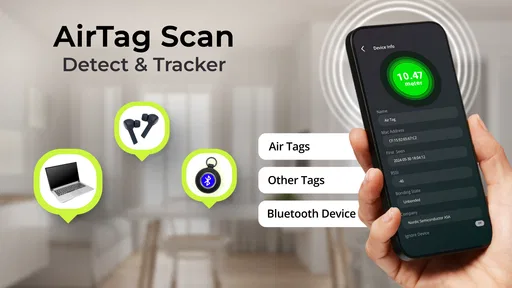
I approached AirTag Scan: Bluetooth Tracker as a practical safety tool rather than a general Bluetooth utility. Its purpose is straightforward: help me look for nearby AirTags, Bluetooth devices, and possible hidden trackers. That narrow focus is also its main appeal. Instead of presenting itself as a full device-management suite, it is aimed at the uncomfortable situation in which I want to know whether an unfamiliar Bluetooth item is close to me.
After using it, my view is that this is most useful as a quick first check. I would keep it available for moments when I am entering a rental car, staying in unfamiliar accommodation, collecting luggage, or trying to understand an unexpected Bluetooth signal. I would not treat a scan as absolute proof that a room or vehicle is clear. Wireless detection is affected by distance, obstacles, battery condition, and the behavior of the device being searched for, so the app works best as one part of a sensible inspection rather than as a guarantee.
How the current version fits into everyday use
The app comes from One Music Player and sits in the tools category. It is free to install, with optional in-app purchases ranging from $0.99 to $99.99 per item. That makes it easy to try before deciding whether its extra capabilities are worth paying for. The content rating is Everyone, and it runs on Android 8.0 or later, so it is available to people using a wide range of phones rather than only recent hardware.
The current release is version 7.0.2. That detail matters because tracker-detection tools depend heavily on how clearly they present scan results and how reliably they handle different Bluetooth signals. A version number alone does not prove that every detection problem has been solved, but it tells me I am looking at an actively identifiable release rather than an unnamed experiment.
Its public reception is encouraging without being a reason to switch off my judgment: the app holds a 4.5 average from around 11 thousand ratings, with roughly 540 written reviews. It has also passed the one-million-install mark. Those figures suggest that the concept has found a substantial audience, but they do not change the basic rule I would follow: a positive result deserves investigation, and a quiet scan should not be interpreted as a complete security inspection.
Starting a scan is the part I found easiest to understand. The useful mindset is to scan more than once and in more than one position. If I am checking a vehicle, I would move slowly through the cabin, pause near seats and storage areas, then repeat the process around the exterior. In a room, I would check from the entrance, near luggage, around furniture, and close to anything that could conceal a small tag. The app can help identify wireless activity, but my physical search gives the result context.
What the scan can and cannot tell me
A detected Bluetooth signal is not automatically a hidden tracker. It may belong to a phone, watch, speaker, computer, car system, earphones, or another ordinary device nearby. This is one of the most important practical distinctions. I would first remove or switch off my own Bluetooth accessories, ask companions to do the same where possible, and repeat the scan. That simple preparation reduces clutter and makes an unfamiliar signal easier to investigate.
Conversely, an unfamiliar result is not automatically harmless just because it appears weak or intermittent. A device may be farther away, shielded by a bag or furniture, or temporarily outside the strongest detection range. I would walk around and watch whether the signal changes as I get closer to a particular object. That movement-based check is more informative than staring at one scan from a single location.
The app is therefore better at answering “is there something nearby worth checking?” than “this exact object is tracking me.” That difference may sound small, but it changes how responsibly I use the results. I see it as a screening layer: useful for raising a question, not a forensic instrument that settles every question on its own.
Three situations where it earns its place
The first situation is travel. Before settling into a borrowed car or taxi, I can make a scan with my personal Bluetooth devices quiet. If an unfamiliar signal appears, I can repeat the scan after moving around the vehicle and then inspect likely hiding places. This workflow is more useful than running the app casually while surrounded by a bag full of connected gadgets, because the initial cleanup gives me a clearer baseline.
The second is shared accommodation. I would scan after arriving, not while walking through a crowded lobby or hallway. A nearby guest’s device can create noise, so repeating the check inside the room gives the result more meaning. I would pay attention to signals that remain present as I move between areas, especially if they seem to follow the room rather than the building’s common spaces.
The third is lost-property or second-hand-item checking. If I buy a used bag, bicycle, or piece of equipment, a scan can provide an early indication that an old Bluetooth accessory or tag is still attached. In this case, the app is not only about personal safety; it can help me understand what I have actually received. I would still inspect the item manually, because a scan cannot explain whether a signal belongs to a legitimate accessory left by the previous owner.
A less obvious use is troubleshooting unexpected Bluetooth behavior at home. When a phone repeatedly shows nearby devices I do not recognize, a controlled scan can help me separate a neighbor’s signal from something inside my own room. I would turn off familiar accessories one at a time, repeat the scan, and note which signal disappears. This is slower than simply accepting every result, but it turns the tool into a basic diagnostic aid.
What has changed for the current release
The clearest confirmed marker of the app’s current state is its 7.0.2 version. I would read that as evidence that the product has progressed through multiple iterations, but I would not invent a feature-by-feature history from the number alone. The important practical point is that users should judge the present scan experience on their own phone, especially because Bluetooth behavior can vary between Android devices.
For someone already using an earlier release, the sensible approach is to update, perform a controlled scan, and compare how understandable the results feel. Use the same room, keep known accessories switched off, and repeat the process from similar positions. That gives a more useful impression than relying on memory. If the newer release presents unfamiliar signals more clearly or makes repeated checks less confusing, existing users may notice the improvement immediately; if the underlying environment is noisy, the update cannot remove every source of uncertainty.
I also like that the app’s role remains focused. Many Bluetooth utilities are built around pairing, file transfer, battery displays, or managing personal accessories. This one is centered on detection, so I do not have to navigate a large toolbox before beginning a safety-oriented check. The trade-off is that it should not be expected to replace a full Bluetooth manager or a dedicated device-finding service.
How existing users should adjust their routine
If I had been using the app casually, the biggest improvement I would make is procedural rather than technical. I would stop treating the first scan as the final answer. Instead, I would create a clean starting point, scan from several positions, and investigate only signals that remain relevant after familiar devices have been removed from the picture.
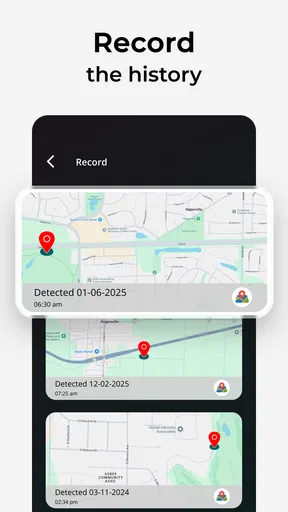
I would also avoid saving a mental label such as “unknown equals dangerous.” A better approach is to record what I know: when the signal appeared, whether it remained present, whether it became stronger near a specific object, and whether it disappeared after I moved away. This keeps the result grounded and prevents an ordinary nearby device from causing unnecessary alarm.
Another useful habit is to scan before and after changing locations. If a signal is present in a hotel room but disappears completely outside, that is different from a signal that follows me through several places. Neither observation proves intent, but the pattern helps decide whether I should inspect the room, ask staff for assistance, or simply identify a neighbor’s device.
People who use the app for family or personal-safety concerns should explain these limits clearly to whoever is relying on the result. The tool can encourage a careful check, but it should not create false confidence. If a result seems concerning, I would combine the scan with a visual inspection and, where appropriate, contact the property owner, transport provider, platform, or local authorities rather than confronting an unknown person.
Where the experience still has gaps
The first gap is interpretation. Detecting a Bluetooth device is only the beginning, and a newcomer may expect the app to identify the owner or prove that a signal is an AirTag. In real surroundings, several devices can be present at once. The more crowded the environment, the more important it becomes to repeat the scan and correlate it with movement and physical inspection.
The second gap is coverage. A scan is not a promise that every tracker in every hiding place will be found. Range, walls, metal, fabric, battery status, and the device’s own transmission behavior can all affect what appears. I would be especially cautious in a vehicle or dense building, where materials and neighboring signals make the result harder to interpret.
The third gap is the distinction between an app and a response plan. Finding a suspicious signal does not tell me what to do next. I may need to check belongings, speak to a venue, preserve information, or seek help. The app can support that process, but it does not replace judgment or appropriate assistance.
There is also a practical purchasing question. Because the app is free with optional purchases, I would begin with the basic experience and only consider paying after I understand what the paid items add on my device. I would not buy simply because a scan produces a confusing result. Confusion usually calls for a cleaner test and a better physical search, not an automatic purchase.
Users looking for a polished tool for pairing headphones, transferring files, monitoring accessory batteries, or controlling smart-home equipment should probably choose a conventional Bluetooth utility instead. This app’s value comes from its narrow purpose. If I want a broad device-management dashboard, its focused design may feel limited rather than convenient.
What I would watch in future use
When I continue using a tracker scanner, I watch three things: whether repeated scans are easy to compare, whether unfamiliar signals can be distinguished from ordinary nearby devices, and whether the app encourages careful interpretation instead of dramatic conclusions. Those qualities matter more to me than a crowded feature list.
I would also pay attention to how the experience behaves in different environments. A quiet bedroom, a parked car, a hotel, and a busy public place each produce different levels of Bluetooth clutter. A tool that feels clear in one setting may become difficult in another, so I would not judge its reliability from a single successful scan.
For existing users, the most valuable future progress would be clearer context around results and a smoother way to repeat controlled checks. I am deliberately separating that expectation from what the current release proves. Version 7.0.2 is the version I can assess today; any later improvement should be judged when it is actually available, not assumed in advance.
My recommendation after using it
I recommend AirTag Scan: Bluetooth Tracker to people who want an accessible first step when an unfamiliar Bluetooth device may be nearby. The free entry point, Everyone rating, and support for Android 8.0 or later make it approachable, while the large existing user base gives me some confidence that it is not an obscure one-off utility.
I would recommend it most strongly for travelers, people buying used belongings, and anyone who wants a repeatable routine for checking a room, vehicle, or bag. The best results come from preparation: silence known accessories, scan slowly, move closer and farther away, repeat from another position, and inspect anything that seems connected to a persistent signal.
I would skip it if I need guaranteed detection, a full explanation of who owns every Bluetooth signal, or a replacement for professional investigation. It is also not the right choice for everyday pairing and accessory management. In those cases, the usual Bluetooth tools are a better match.
My final opinion is positive but measured. This app gives me a useful way to begin an investigation, and its focused purpose is more valuable than a generic Bluetooth screen when my concern is an unfamiliar tracker. Its real strength is not certainty; it is helping me ask the right question and check the surroundings more methodically. Used with that expectation, it is a practical tool worth keeping available.
Verdict
Strengths of AirTag Scan: Bluetooth Tracker
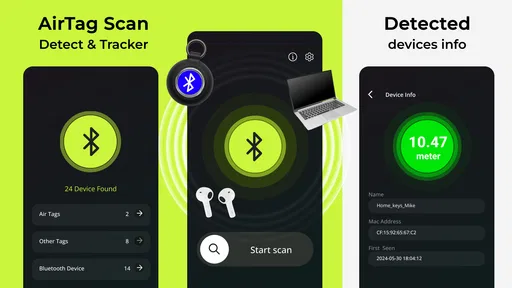
- Quickly detects nearby Bluetooth trackers and unknown AirTags.
- Simple interface makes scanning easy for nontechnical users.
- Helpful alerts can support personal safety and privacy checks.
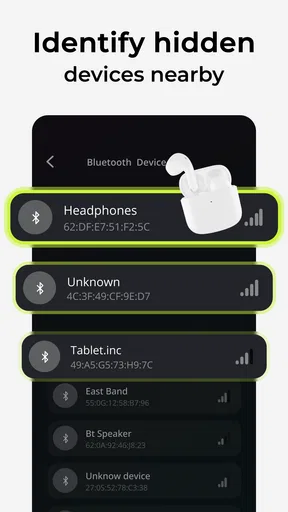
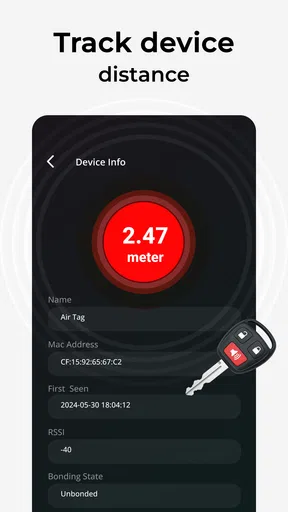
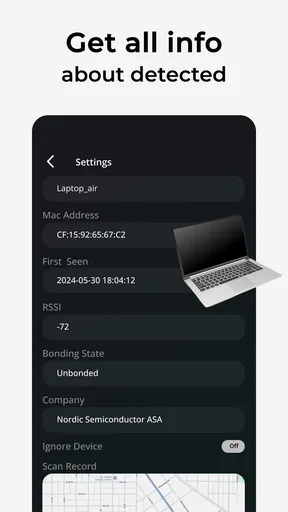
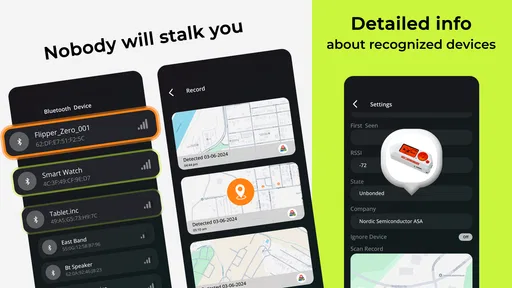
- Shows tracker details useful for identifying unfamiliar devices.
- Lightweight app with a focused purpose and minimal setup.
Limitations of AirTag Scan: Bluetooth Tracker
- Requires Bluetooth and location access to scan effectively.
- Cannot disable or remove an AirTag from the owner's account.
- Detection range depends heavily on phone model and surroundings.
- Background monitoring may be limited compared with Apple's Find My.
- Some features may require payment or include advertising.
Other Releases by One Music Player
View All
Universal Tv Remote-Cast to TV
House & Home4.1

HD Camera for Android
Beauty4.5

Smart Watch - Clock Wallpaper
Personalization4.6

AI Music & Song Generator
Music & Audio4.6
Similar Picks in This Category
View All
Google LLC4.0

Gboard - the Google Keyboard
Google LLC4.5

Google Play services
Google LLC4.3

Google Play Store
Google LLC4.9

Files by Google
Google LLC4.5

SHAREit: Transfer, Share Files
Smart Media4U Technology Pte.Ltd.4.3
Frequently Asked Questions
What is AirTag Scan: Bluetooth Tracker used for?
AirTag Scan: Bluetooth Tracker is designed to scan for nearby Bluetooth devices and help identify unknown trackers or other Bluetooth accessories around you. It can be useful if you suspect that an unfamiliar tracking device is traveling with you or simply want to discover Bluetooth devices in your surroundings. The app is intended as a detection and awareness tool, not as a guaranteed security solution.
Can AirTag Scan detect every AirTag or Bluetooth tracker nearby?
No application can guarantee that it will detect every tracker in every situation. Detection may depend on Bluetooth being enabled, the device’s battery level, signal strength, distance, movement, and the permissions granted to the app. Some trackers may remain quiet or use proprietary communication methods. For the best results, scan in different locations and follow any safety guidance provided by the app.
Does AirTag Scan: Bluetooth Tracker require special permissions?
The app may request access to Bluetooth and, depending on your operating system and device settings, location-related permissions. These permissions are commonly required for Bluetooth scanning to work correctly. Before accepting them, review the permission explanation and your phone’s privacy settings. You should also check the app’s privacy policy to understand what information may be collected, stored, or shared.
Can I use AirTag Scan to track my own lost keys, phone, or belongings?
AirTag Scan: Bluetooth Tracker is primarily intended for discovering nearby Bluetooth devices and identifying unfamiliar trackers. It should not be treated as a complete replacement for Apple’s Find My network or the official tools supplied by a tracker manufacturer. If you own an AirTag or another compatible device, the manufacturer’s official application will usually provide more reliable location history, ownership features, and precision-finding options.
What should I do if the app finds an unknown tracker?
If the scan reveals an unfamiliar tracker, do not immediately assume that it is being used maliciously, since it could belong to someone nearby or be attached to a shared item. Move to a safe, public location and repeat the scan if necessary. Check the device information and use official platform instructions for identifying or disabling it. If you feel threatened, contact local authorities or a trusted safety organization rather than confronting anyone.
